 Web HostingCost-effective shared hosting solutions
 Reseller HostingStart your own hosting business without tech hustle
 Affiliate ProgramEarn commission by referring customers to our platforms
 cPanel HostingHosting powered by cPanel (Mostly user friendly)
 Windows HostingOptimized for windows based-applications and sites
 Domain SearchFind and register available domain names in seconds
 Email HostingProfessional email hosting for your domain (Secure, reliable, and easy to manage)
 WordPress HostingLightning-Fast, Optimized WordPress Hosting
 All DomainsExplore and register domain extensions across the world
 PH DomainsBuy trusted .ph domains tailored for Philippines businesses and individuals
 Domain Transfermove your domain to us with zero downtime and full control
 Whois LookupLook up domain ownership, expiry dates and registrar information
 SSL CertificatesSecure your website with trusted SSL Certificates for data protection and customer trust.
 .com DomainSecure the most recognized domain for global credibility
 VPS HostingScalable virtual servers. Full root access. Faster speed.
 Managed VPSNot a tech expert? Choose our fully managed VPS server.
 Dedicated ServersGet the full power and complete control of your own physical server.
 AI Websites BuilderCreate beautiful websites instantly with AI.
 Online Shop BuilderBuild a professional online shop. No coding required.
 Web Design ServiceGet a custom-designed website tailored to your brand and goals.
 BlogExplore guides on web hosting, online business, digital marketing, and more
 Contact UsReach us anytime by chat or email
 SupportFind answers and guides for all our services
Did you know that nearly 80% of businesses experience downtime simply because they forgot to renew their domain?
Your website’s domain name is its lifeline; once it expires, your site can go offline, emails stop working, and you could even lose your name to someone else.
So, how do you make sure this doesn’t happen to you? The good news is that renewing your domain in the Philippines is quick and simple.
In this guide, we’ll walk you through the steps for .PH domains, .COM domains, and more, plus share how Truehost PH makes it easier to keep your online presence running smoothly.
Why Do You Need to Renew a Domain?
Owning a domain name doesn’t mean you own it forever. When you first register a domain, you’re essentially leasing it for a specific period, usually one year, but you can also register for multiple years.
Once that time runs out, the domain needs to be renewed to stay active. If you don’t renew:
- Your website goes offline
Visitors typing your domain name will see an error instead of your site.
- Emails stop working
If your domain is connected to a professional email, those addresses immediately become unusable.
- Your brand reputation suffers
A sudden “website not found” can make customers lose trust.
- Someone else can take your name
Once it’s fully expired, your domain goes back on the market. Competitors or strangers can buy it, and you may never get it back.
Steps to Renew a .PH Domain
The .PH domain is the official country code domain for the Philippines.
It’s managed by dotPH, but you don’t renew directly with them. Instead, you use an accredited registrar like Truehost PH.
Renewing is quick and easy. Just follow these steps:
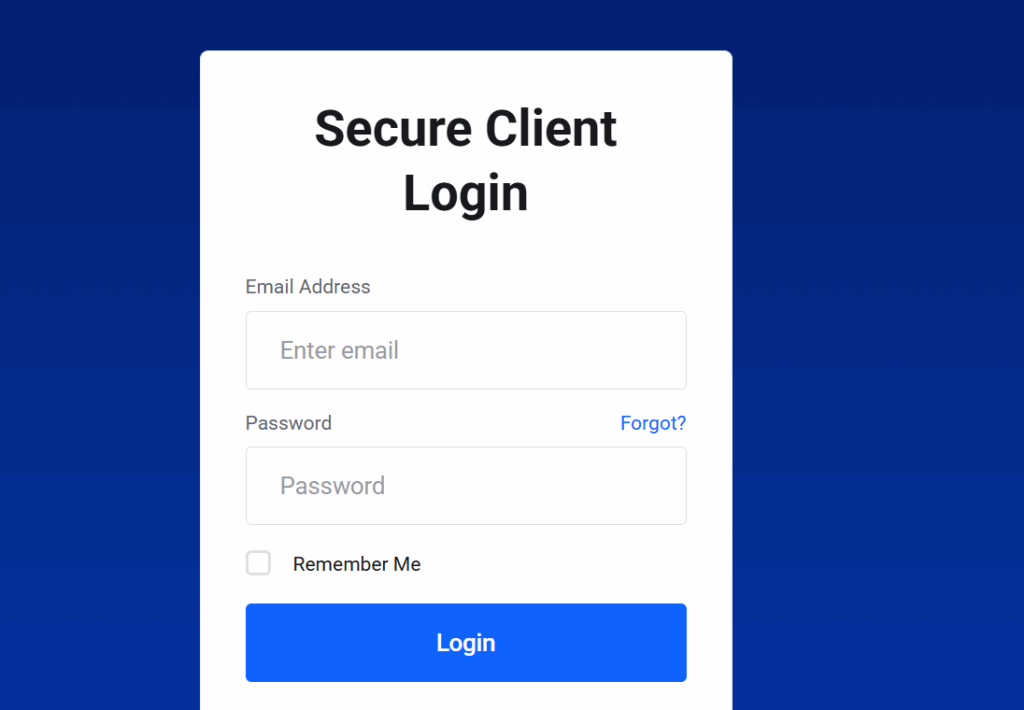
1) Log in to Your Truehost PH Account
Go to the client dashboard using the email and password you used to register your domain.
2) Open the Domains Section
Once inside your account, look for the list of all your registered domains.
3) Select Your .PH Domain
Find the domain you want to renew. Each domain will display its status and expiry date.
4) Click on Renew
Choose the renewal option.
5) Choose Renewal Period
Decide how long you want to extend ownership, ranging from 1 year to 10 years.
- Short-term (1–2 years): Great if you’re testing a project.
- Long-term (3–10 years): Best if you want to secure your domain for the future and avoid yearly renewals.
6) Make Payment
Confirm your renewal order and pay securely. Truehost PH supports several local and international payment methods, making it convenient wherever you are in the Philippines.
7) Confirmation
Once your payment goes through, your .PH domain is renewed instantly. You’ll get an email confirmation for your records.
How Long Does It Take?
The process takes only a few minutes. As soon as payment is completed, your domain status updates automatically — no waiting required.
Renewal Reminders
To make sure you never forget, Truehost PH sends renewal reminders before your domain expires. This gives you enough time to renew and keep your website online without disruption.
Steps to Renew a .COM Domain in the Philippines
The .COM domain is the most popular domain worldwide. Unlike .PH, which is country-specific .COM, works globally and can be renewed through any accredited registrar.
However, using a local registrar like Truehost PH makes the process easier; you get support in pesos, local payment options, and quick assistance if you run into issues.
Here’s how you can renew a .COM domain in the Philippines:
1) Sign In to Your Registrar Dashboard
Log in to the account where your .COM domain is registered. If you’re using Truehost PH, head to your client area.
2) Select Your .COM Domain
Go to the domain management section and pick the .COM domain that’s about to expire.
3) Click on Renew
Choose the renewal option to extend ownership of your .COM domain.
4) Set the Renewal Term
Most .COM domains can be renewed for 1 to 10 years.
- 1 year: Standard option if you prefer annual payments.
- Multiple years: Great if you want to secure your domain long-term and avoid yearly reminders.
5) Complete Payment
Pay using your preferred method. With Truehost PH, you can pay directly in pesos through local banks, cards, or e-wallets, with no extra currency conversion fees.
6) Receive Confirmation
Once your payment is processed, your .COM domain will be instantly renewed, and you’ll get a confirmation email.
Renewing Other Domains Like .NET, .ORG, or .PH Subdomains
The renewal process is nearly the same for other extensions, but here’s a quick breakdown:
- Subdomains like .COM.PH, .NET.PH, or .ORG.PH – These follow the same renewal process as .PH domains, since they are managed under the Philippine registry (dotPH).
- Global domains like .NET, .ORG, .BIZ, etc. – These are renewed just like .COM domains, directly through your registrar’s portal.
- Renewal duration: Most global domains (.COM, .NET, .ORG) allow renewal of up to 10 years.
Costs to Renew Domains in the Philippines
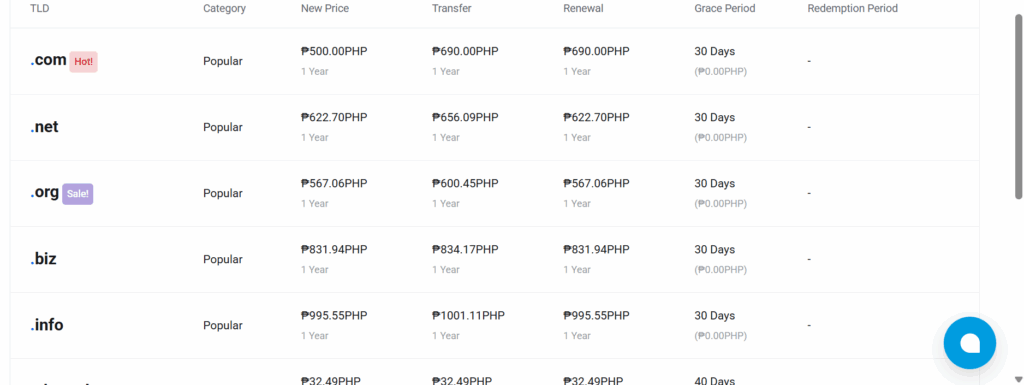
The cost of renewing a domain depends on the type of extension you own and the registrar you use.
Some domains are more expensive because they’re managed locally, while others are cheaper due to being global standards.
- .PH Domains – These are the official country-code domains of the Philippines. Renewal costs usually range between ₱2,500 to ₱3,000 per year.
At Truehost PH, we offer one of the lowest renewal rates, making it easier for businesses and individuals to keep their local identity online.
- .COM Domains – As the most common domain worldwide, .COM is more affordable to renew. You can expect to pay around ₱800 to ₱1,200 per year, depending on your registrar.
- .COM.PH Domains – Designed for businesses operating in the Philippines, .COM.PH renewals typically cost between ₱2,000 to ₱2,500 per year.
- .ORG.PH Domains – Commonly used by non-profits and organizations .ORG.PH renewals also fall in the ₱2,000 to ₱2,500 per year range.
Grace Periods: What If You Miss the Renewal Date?
If your domain expires, it doesn’t vanish immediately. Most registries give you a grace period to catch up on renewal:
- .PH Domains – You typically have up to 30 days after expiry to renew at the standard cost.
- .COM Domains – You usually get up to 40 days before penalties kick in. After that, the domain enters a redemption period, which adds extra fees.
However, once the grace and redemption periods are over, the domain is released back into the market. At that point, anyone can buy it, even your competitors.
That’s why it’s always smarter to renew on time or enable auto-renew through your Truehost PH account.
This way, your domain and your brand stay safe without extra stress or cost.
Set Up Auto-Renew to Avoid Hassles
Auto-renew charges you before expiry. Your domain stays active.
How to set it:
- Log in.
- Find domain settings.
- Turn on auto-renew.
- Add payment method.
We at Truehost PH enable this for free. You forget worries.
Common Mistakes to Skip When Renewing
Many trip up. Avoid these:
- Ignore emails: Check reminders.
- Wrong info: Update your contact details.
- Delay: Renew early.
- No lock: Protect from transfers.
You stay safe with our tips.
What Happens If Your Domain Expires?
First, it deactivates. Site goes down.
Grace period starts. Renew quickly.
Then redemption: Pay extra, like ₱5,000+.
After 70-80 days, it’s gone. Anyone can buy it.
In the Philippines, .ph follows global rules. But local risks rise.
Renew now to protect your online home.
Renew Your Domain with Truehost PH
At Truehost PH, we make domain renewal simple:
- Easy online management.
- Multiple secure payment methods.
- Free reminders before expiry.
- Local support you can count on.
Final Thoughts
Renewing a domain may seem like a small task, but it’s one of the most important steps in protecting your online presence.
Without timely renewal, your website can go offline, your emails can stop working, and worse, you could lose your domain name to someone else.
Whether you’re renewing a .PH domain for local reach or a .COM domain for global presence, the process is simple when you use a reliable registrar.
At Truehost PH, you can manage all your domains in one place, pay in pesos, and get reminders before expiry so you never risk losing what you’ve built.